
Hello valued readers! Today’s topic is something I’ve been excited to dig into: Lacuna Book Formatting.
Unlike the other book formatting programs this one was highly requested in my inbox so I had to check it out.
To get the quick nitty gritty, it ended up not being my favorite but it did have a lot of good things going for it that I think you guys will enjoy.
So, without wasting any more of your time – let’s dig right in!
So, is Lacuna Really That Good?
I hate to put it this way, but truthfully that depends. While there was a lot going on and a TON of customization options available, that was honestly a bit overwhelming for me. I just need a simple to use book writing and formatting program.
So, with that being taken into consideration let’s break down each aspect so that you can make your own assessment of the program and decide for yourself if it’s worth the cost for you.
How Much Does Lacuna Cost?
Lacuna runs on a licensing system. So, each license can be used on one device at a time. Since it’s a downloadable program, in order to switch to another device you’d need to deactivate first.
With that being said, the licenses are currently $129 for a single license. $229 for a two computer license, and $299 for three computer license. Any more than that you’ll likely have to reach out to their team directly for what deals they may offer.
For my simple needs, the $129 was a reasonable price and it’s lifetime so I’m excited about that!
Is There a Lacuna Free Version?
Yup! But with a caveat.
For Lacuna you can install the program and fully use everything that comes with uploading, writing and formatting – but you can’t export.
In order to export you much purchase a license. Understandable and I respect it but also, some of the issues I ran into later on came into play with the exports…
What is Lacuna & What is Lacuna Used For? My Personal Overview:
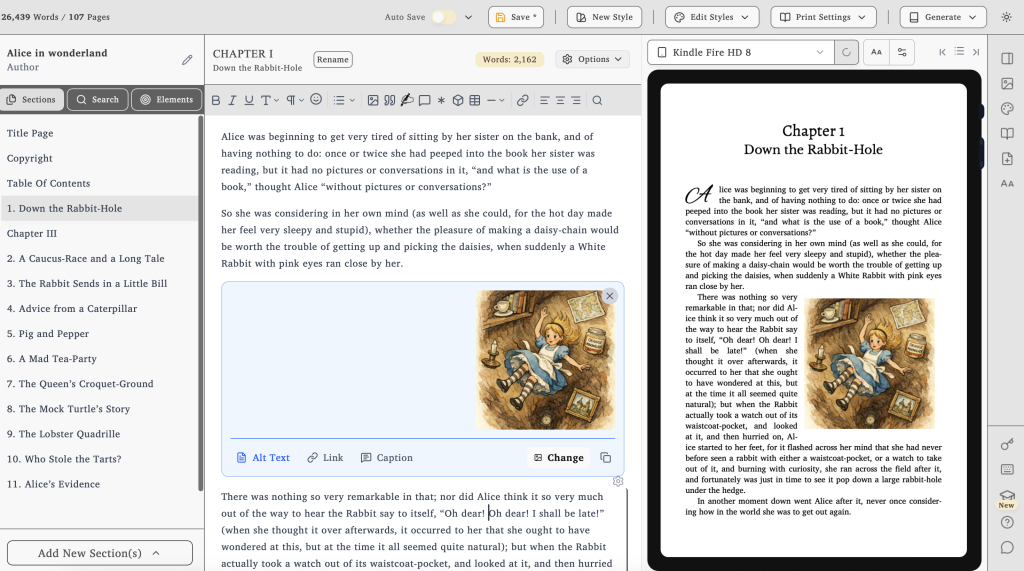
Lacuna is another all-in-one book writing and formatting platform. They pride themselves on being downloadable and only save your files to your computer directly.
No dealing with a cloud server. No syncing, no AI training and no data mining. Valuing the author’s privacy and those that desire to save local.
Lacuna Pros and Cons
There are a number of Lacuna pros and cons that I thought I would sum up here:
Lacuna Advantages
Here are the things I like most about Lacuna:
- Available for both Mac and PC
- Test Before You Buy
- Saves to your personal device, no cloud servers
- Table creation ability
- Formatting functionalities
- Their descriptive and convenient image gallery
Available for both Mac and PC
Since Lacuna is a downloadable program, it offers both Mac and PC downloads. So, unlike other similar competitors like Vellum, they are a lot more robust and available.
Test Before You Buy
This was pretty cool since you could actually get the full experience of the program before making a decision to purchase. So, if you are contemplating on whether you want to take the plunge, they do allow you to fully install the program and test it out.
You just can’t export.
No Cloud Servers
This is something that I’ve noticed a lot of authors ask for within the industry. With the world split on the use of AI, it seems there’s more of a need to have works saved internally rather than externally. Although this may be a turnoff for some because it voids the feature of auto-saving, for many this is a bonus!
Table creation ability
This was something I was very excited to test out. The feature was significant. It was simple to use and extremely customizable with what I wanted. Even color could be added!
Just keep in mind when printing, color costs more. So although it’s great for looks, I’ll probably keep any charts minimal with black and white to avoid that extra cost.
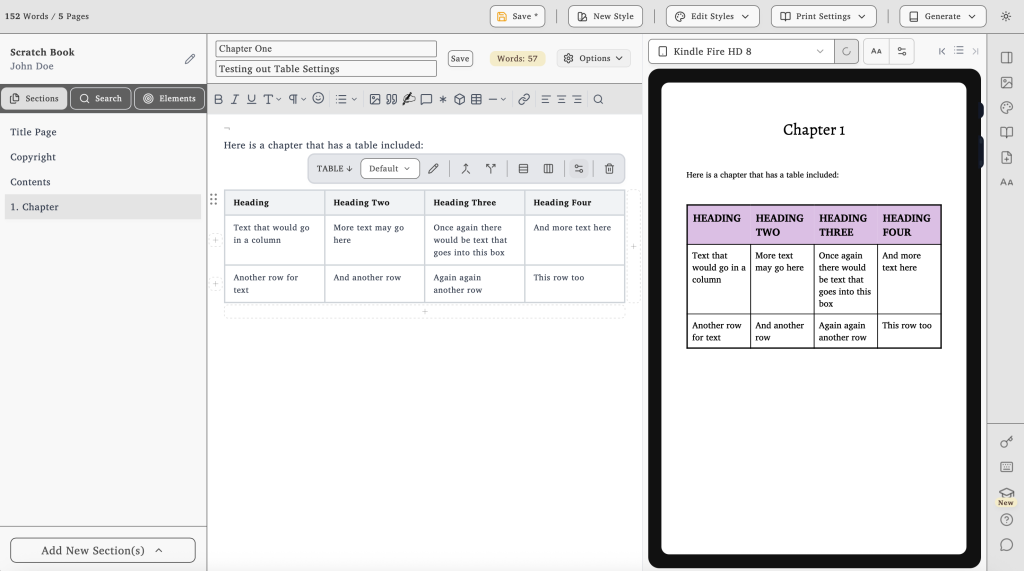
The functionality with ePub files was good. I found it nice that the columns were kept consistent; however, with larger columns, I just don’t think ePub files are the way to go. You may find it better to add them as imagery, yet to avoid them being cut off in unwanted locations.
Formatting functionalities
This came as a pro and con. The pro aspect of it was that the options felt limitless. The con aspect, which I’ll dig into more later on, was also just that. There is so much to discover.
If you know what you want and want zero limitations, this is your program.
From font size, spacing, imagery layout and more, I really found little that didn’t have a setting for it.
Descriptive and Convenient Image Gallery
I thought this was neat and quite handy. Not only in the image gallery do they provide you with the exact dimensions of your uploaded images, but they also have different help icons throughout that give you proper guides on where you should place your imagery based on printing guidelines as well as sizing help if you had an image too large or small.
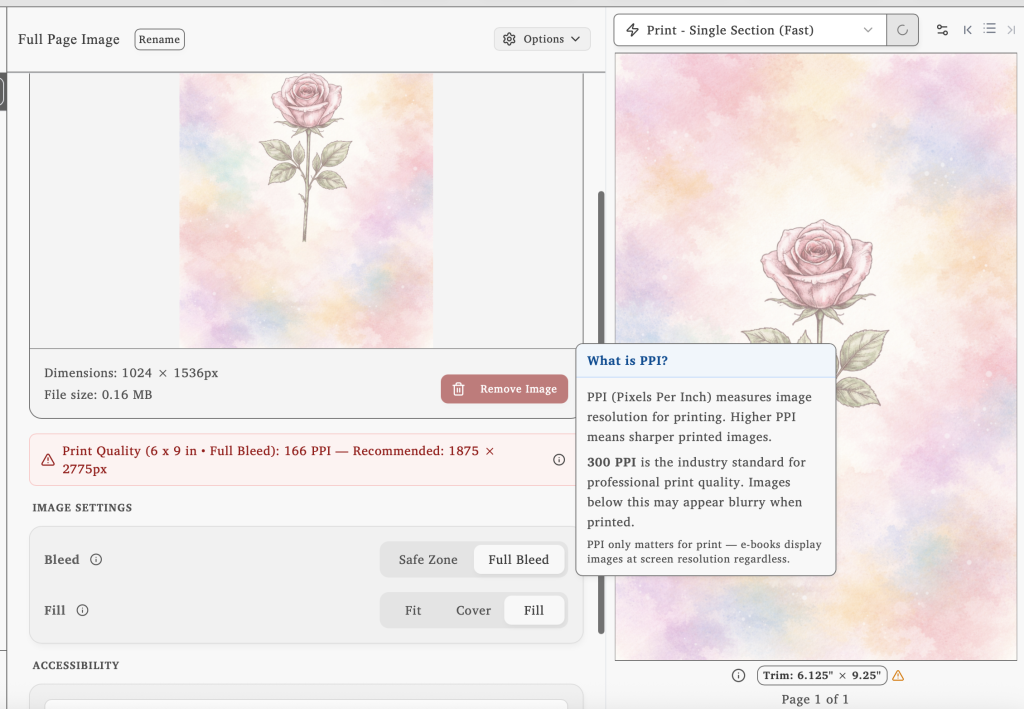
Having this is awesome if you aren’t image savvy! It’s something I’d like to see right away rather than getting to the printing stage and figuring out then.
So kiddos to Lacuna on that!
Lacuna Disadvantages
While Lacuna has a lot going for it, it’s not a perfect program. Honestly there’s a bit they could work to improve on yet:
- No collaboration
- Refunds…
- There’s A LOT to learn
- Docx exports
No collaboration
This was doesn’t really come as a shocker since the program is built to work internally on your specific device. But it was a negative towards the program.
In today’s day and age, many authors like to share their works with beta readers and editors. Often times a .docx is suffient but I like a reader to have the full experience. Also, something I’ll take about later, their .docx files are pretty bad. So even then it doesn’t work for those needs.
If there was a feature for collaboration that would be great. However, I don’t for see that happening at any point while they maintain their program to be device located.
Refunds…
Although I don’t want to get too far ahead of myself here, I found nothing that related to a guaranteed refund policy. Now I can understand if they don’t allow it since they have a ‘free’ version that allows you to test everything out but export beforehand.
However, with some of the exporting flaws I learned, I am curious what they would say if a refund was requested after the fact.
I appreciate other programs offering this upfront because it gives me confidence in the program right away.
There’s A LOT to learn
As I mentioned before, although the formatting options feel endless, that also comes with a large learning curve. Right away when opening up the program with a fresh set of eyes I had no idea where to go or what to do.
They did offer a guided walkthrough but that had over 100 slides and by the time I got to the end I forgot what was first.
So, if you’re someone that just wants a clean and simple interface, this might not be the best place for you.
Docx exports
This was a bit of a disappointment for a program with so much potential. On several occasions, I found images exported to a .dcox that were entirely wrong. Whether the image was squeezed and looked terrible or the wrong image was displayed.
How something like this happens, I’m not too sure. The first time I noticed it, I had to double-check myself because I thought it was just me. But nope – it happened again and again.
For the program to have a ton of potential in many other aspects, not having a reliable .docx is disappointing. I’m not too sure I can fully trust a program that can’t export to a .docx cleanly.
Some Lacuna Customer Reviews
Full disclosure here, I did some research and could really only find ‘reviews’ on their website. They are a bit newer, so that’s to be expected. However, from other programs I reviewed in the past, website reviews can really only be taken with a grain of salt unless it’s a name that you know.
“I tried numerous formatting methods and followed endless instructions from publishing websites, but nothing ever turned out right. Since finding Lacuna, everything has changed. I’ve been able to update all my manuscripts effortlessly and give them the professional look they deserve.
Lacuna helped me perfect one of my most cherished stories, The Magic Globe, and finally present it exactly as I envisioned. It’s truly been a game changer for my author journey.” – Samuel Graham Astley
“I can honestly say the Lacuna Book Formatter has everything I need to control my eBook. I started my publishing journey with prior knowledge of building websites with HTML and working for Barnes & Noble when the first Nook was introduced. I learned all I could to get my ebook on every device in my store, fueling my need to add more flare for my readers.
The Lacuna Book Formatter has all the features I learned to code, plus a heavy dosage of new features I never thought of, all presented in an easy-to-use program that takes the guesswork out of creating ebooks that people want to read. Trust is important when designing a unique experience for my readers of the Thicket Trilogy, and Lacuna is part of that family.” – A T Veatch
Review of Lacuna’s Support
From the brief experience I’ve had with their team, they seem nice. Their response time was good, as I just had a few basic questions before purchasing.
However, I am curious to learn more about how they handle refunds and what a conversion like that would prompt.
So, I guess only time will tell here!
Is Lacuna Worth it? My Conclusion
From my personal experience, the answer to this honestly depends.
Although it has a lot going for there, there are a few major drawbacks that I can’t see myself giving up what I currently use, Atticus, for them. The lack of collaboration, inconsistencies in exports, and the overall learning curve, it seems like too much to make the jump.
Now, if you aren’t like me and don’t currently have a program you adore, this might be just for you!
Just remember, it will take time to figure out. So, don’t make your first time using it be within a week’s time for your deadline. Give yourself some grace and jump into it now before you pull out hairs trying to remember where a specific button is located.
0 Comments